
Why Do Resin 3D Prints Crack Days After Printing?
Resin 3D prints can crack days after printing because liquid resin remains trapped inside hollow sections, cleaning solvent has not been completely removed, or internal stresses develop during curing and subsequent handling. In some cases, the problem originates in the CAD design, resin selection, or support-removal process rather than the printer itself.
A model may look perfectly intact when it leaves an LCD, SLA, MSLA, or DLP printer. It may even pass its initial inspection after UV post-curing. Yet a hairline crack can develop the following day, or a hollow section may split several days later.
For factories, dental laboratories, engineering teams, and model manufacturers, this is more than a cosmetic defect. Delayed cracking can compromise assembly fit, handling strength, or the reliability of a production batch.
The correct response is not simply to increase exposure time or switch to a different resin. Start by identifying when the crack appeared, where it started, and which part of the printing workflow could have introduced the problem.
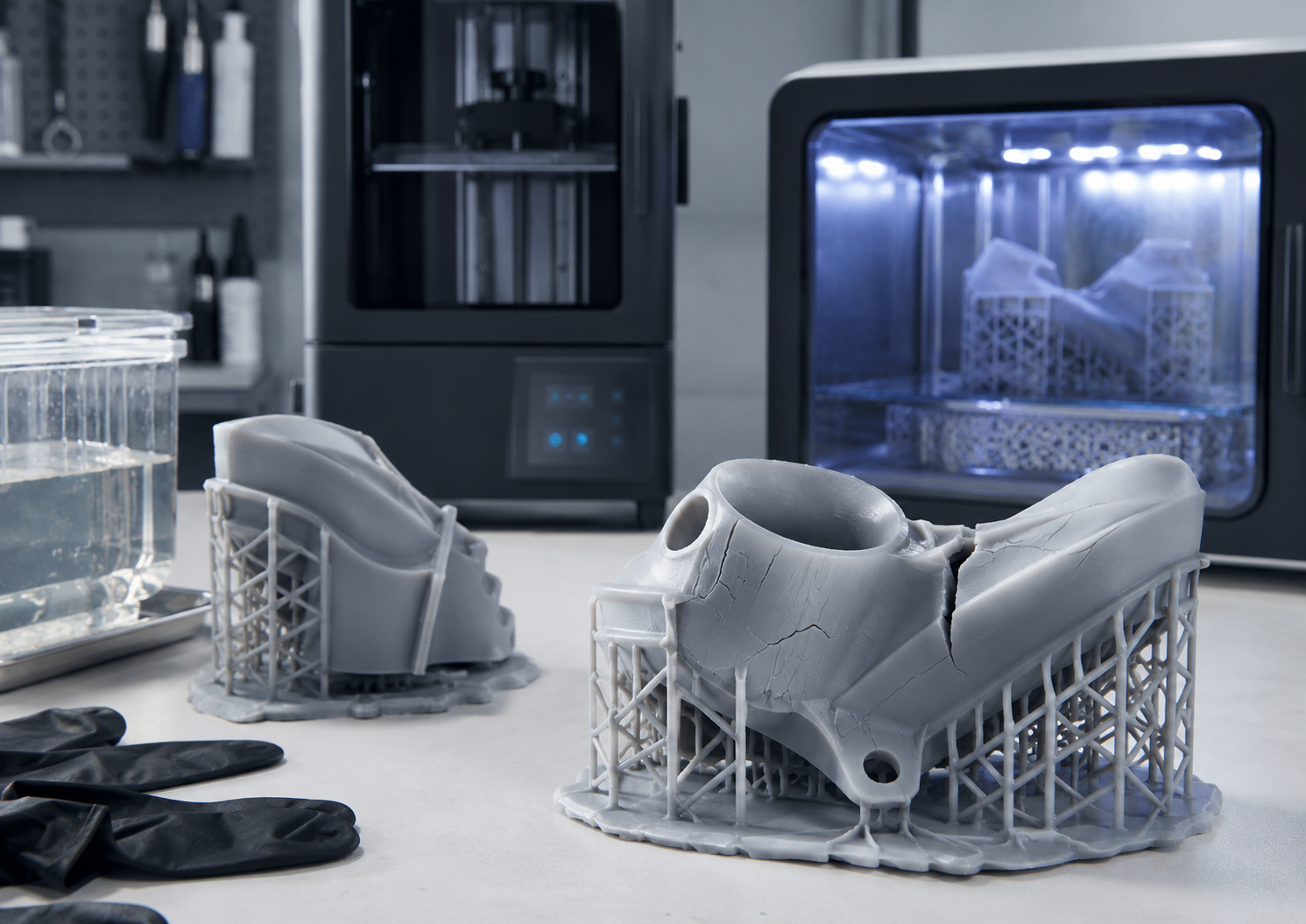
What Causes Resin Prints to Crack After Several Days?
1. Uncured Resin Trapped Inside Hollow Parts
One of the first things to investigate is whether the model contains an enclosed cavity.
Hollowing is useful for reducing material consumption and part weight. However, a hollow model that has not been designed for proper drainage can retain liquid resin after printing.
That remaining resin may continue to react under light or heat. Residual liquid and differences between the cured shell and interior can contribute to internal stresses, leakage, and eventual cracking.
The outer surface may be clean and fully cured while the cavity still contains liquid resin.
What to check: Review the sliced model for enclosed volumes, disconnected internal chambers, blocked drainage openings, and regions that could retain liquid at the washing orientation.
2. Drainage Holes That Cannot Remove Trapped Liquid
Adding a hole to a hollow model does not automatically guarantee complete drainage.
The hole must be accessible, large enough for the actual resin and cleaning process, and correctly positioned for the model's orientation.
For many hollow geometries, at least two openings are a useful starting point: one allows liquid to leave while another provides a route for air to enter. Complex models may require additional openings, particularly when separate chambers are present.
Hole diameter should be validated against the selected printer, resin viscosity, feature resolution, and cavity geometry. There is no single reliable drain-hole size for every resin printer.
During model preparation, check whether the openings remain usable after support generation and printing. During washing, rotate the model and confirm that the liquid can actually leave each cavity.
3. Incomplete Washing or Drying
Resin prints normally require cleaning before UV post-curing. For hollow models, cleaning must reach the interior as well as the outer surface.
A short external wash may leave residue in narrow channels, pockets, grooves, and hollow chambers. Conversely, a part can retain IPA, water, or another cleaning liquid after washing.
Some resin formulations can absorb cleaning solvent. Excessive soaking may cause swelling, surface damage, or changes that become visible only after the part dries.
Follow the material supplier's approved washing method and duration. Do not assume that every resin can be washed with IPA, or that water-washable resin can tolerate prolonged immersion.
Before curing, make sure the part has drained and dried sufficiently, including internal cavities that are not visible from the outside.
For a complete production workflow, see How to Clean, Wash and Cure Resin 3D Prints.
4. Post-Curing Shrinkage and Residual Stress
Resin printing is a photopolymerization process. The printed part can continue developing its final material properties during UV post-curing.
Post-curing may increase stiffness and cause additional dimensional shrinkage. The extent depends on the resin formulation, geometry, curing conditions, and degree of conversion achieved during printing.
When a thin wall joins a thick section, or when different surfaces receive different curing conditions, dimensional changes may be constrained by the surrounding geometry. This can create residual stress.
Excessive post-curing may also reduce elongation and make certain resin formulations less tolerant of deformation.
However, longer curing is not always harmful, and shorter curing is not automatically safer. The correct cure cycle must follow the resin manufacturer's validated instructions, particularly for functional engineering and regulated dental materials.
5. Weak Geometry, Handling Damage, or Storage Conditions
Not every delayed crack comes from trapped resin.
Sharp internal corners, unsupported thin walls, holes near highly stressed edges, and sudden thickness changes can act as stress concentrators.
Support removal may also introduce small defects that are difficult to see immediately. These defects can become more noticeable during later handling or service.
Storage and environmental exposure are additional variables. Heat, sunlight, mechanical loading, and material-specific environmental sensitivity may affect parts over time.
If cracks consistently begin at the same geometric feature, inspect the CAD design and handling procedure before assuming that the printer is defective.
How to Identify the Cause from the Crack Pattern
The appearance and timing of a crack provide useful clues, although they cannot establish the cause on their own.
| Observed Symptom | Possible Cause | First Inspection |
|---|---|---|
| Hollow part splits after several days | Trapped resin or incomplete internal cleaning | Check cavity design, drainage, and visible residue |
| Fine surface cracks appear after washing | Excessive solvent exposure or material sensitivity | Review wash duration and solvent compatibility |
| Cracking begins during or shortly after curing | Curing-related stress or existing structural weakness | Review resin curing instructions, geometry, and cure records |
| Crack begins at a support contact | Removal damage or local stress concentration | Inspect support size, placement, and removal sequence |
| Cracks repeatedly appear at the same corner or hole | Geometric stress concentration | Review wall transitions, corner radii, and applied loading |
| Different models crack in the same production batch | Shared resin or post-processing variable | Review resin batch, wash liquid, cure settings, and handling |
Important: If a cracked part is leaking liquid or may contain uncured resin, remove it from service and handle it as a potentially resin-contaminated part. Wear suitable protective equipment and follow the resin and cleaning-agent safety instructions. Do not attempt to solve a contaminated, enclosed cavity by simply applying more UV light to the outside.
How to Prevent Delayed Cracking: A Practical Workflow
Step 1: Review the CAD Model Before Slicing
Look for thin shells, enclosed spaces, isolated hollow regions, sharp corners, and abrupt changes in wall thickness.
Where the design permits, use gradual wall transitions and suitable corner radii. If hollowing is unnecessary, evaluate whether a solid or alternative construction would better meet the application requirements.
Step 2: Design Drainage Together with Print Orientation
Place drainage openings where resin can escape during printing and where cleaning liquid can flow during post-processing.
Consider the orientation of the finished model as well as its orientation on the build platform. An opening that works during printing may not drain the cavity when the model is placed in the washing equipment.
Confirm that each independent internal chamber has an appropriate liquid and air path.
Step 3: Use Material-Compatible Cleaning
Select the cleaning liquid and washing procedure from the resin supplier's instructions.
For complex models, a staged cleaning process may help remove residue. Internal channels and cavities may need controlled flushing, provided the model geometry and material support that procedure.
Avoid leaving printed parts in cleaning liquid longer than recommended. Replace contaminated washing liquid as required.
Step 4: Drain and Dry Before Post-Curing
After washing, allow liquid to escape from internal openings. Rotate the model where appropriate, inspect drainage points, and verify that liquid is not visibly pooling inside the part.
Use a drying method compatible with the resin, equipment, and workshop safety requirements. External surface dryness alone does not prove that an internal chamber is dry.
Step 5: Apply a Controlled UV Curing Process
Use the recommended wavelength, curing duration, and temperature for the selected resin.
A controlled UV curing station can make the process easier to repeat and document than uncontrolled sunlight exposure. However, equipment alone does not guarantee uniform curing of inaccessible internal surfaces.
Yidimu provides UV curing and post-processing equipment for resin printing workflows. The curing procedure must still be matched to the actual material and part geometry.
Step 6: Inspect the Part After Curing and During Storage
Do not rely only on the appearance immediately after printing.
For applications where delayed cracking would cause a significant problem, define a representative inspection period that reflects the expected storage and service conditions.
Check crack initiation points, critical dimensions, fit, surface condition, and any signs of leakage or deformation.
A Simple Validation Method Before Batch Production
When the same model repeatedly cracks, changing several settings simultaneously makes it difficult to identify what actually helped.
A more useful engineering approach is a controlled comparison.
Compare the Existing Design with an Improved Drainage Design
Prepare two versions of the same part:
Version A: The existing hollow design, provided it can be processed safely and contains no intentionally sealed liquid-filled cavity.
Version B: A revised design with improved drainage and internal cleaning access.
Keep the resin formulation, printer, exposure profile, cleaning procedure, drying method, and curing cycle consistent between versions. Record any unavoidable differences in orientation or support layout.
Print more than one specimen of each version where practical. Compare the resulting parts using the same inspection criteria.
The following is an illustrative inspection schedule for a short production trial, not a universal material qualification standard:
| Inspection Point | Recommended Check | Information to Record |
|---|---|---|
| After post-curing | Visible defects, fit, leakage, and key dimensions | Initial part condition and measurements |
| After 24 hours | New hairline cracks, deformation, or residue | Change relative to initial inspection |
| After 72 hours | Crack growth, dimensional change, and handling condition | Location and extent of any new defect |
| After 7 days | Part stability under defined storage conditions | Final observations for the short trial |
If the revised design performs better, drainage or the related geometry may be contributing to the problem. That observation is useful, but it is not proof that drainage was the only cause.
If both versions develop similar defects, review the shared variables: resin batch, washing procedure, curing profile, handling, and storage conditions.
Do not intentionally create sealed cavities containing uncured resin for comparison testing. A representative validation plan must remain compatible with the material safety instructions.
For critical production parts, this short comparison does not replace application-specific mechanical testing, environmental conditioning, or qualification of the finished component.
What Should Factories Record When Resin Parts Crack?
A practical failure record should capture more than a photograph of the broken part.
Part number, CAD revision, and intended application
Printer model and resin formulation or batch
Layer thickness, exposure profile, and print orientation
Hollowing configuration and drainage-hole locations
Support placement and removal procedure
Cleaning liquid, wash duration, and drying method
UV curing equipment, duration, and temperature where applicable
Inspection dates, storage conditions, and crack locations
These records help distinguish a repeatable geometry problem from a shared material or process issue. They are especially valuable when several operators or production shifts use the same equipment.
Frequently Asked Questions
Can a solid resin 3D print crack days after printing?
Yes. Solid parts can develop cracks because of curing-related stress, unsuitable resin properties, solvent exposure, geometry, mechanical loading, or storage conditions. Trapped resin is not the only possible explanation for delayed cracking.
Will longer UV curing prevent resin prints from cracking?
Not necessarily. Additional curing cannot remove liquid resin trapped inside a cavity or correct a weak design. Excess curing may also increase brittleness in some formulations. Follow the material-specific post-curing instructions instead of increasing curing time without validation.
Can water-washable resin prints crack after a few days?
Yes. Water-washable resin still requires suitable cleaning, drainage, drying, and post-curing. Internal water retention, prolonged washing, weak geometry, or unsuitable curing conditions may contribute to defects. Contaminated wash water must be handled according to applicable disposal requirements.
Can a cracked resin print be repaired and reused?
A cosmetic model may sometimes be repaired for display, depending on the material and damage. However, a repaired crack does not establish that the part has recovered its original strength or reliability.
For functional components, load-bearing prototypes, and regulated dental applications, do not return the part to service without appropriate evaluation. If uncured resin remains inside, the contamination must be addressed safely before any repair is considered.
Final Considerations
A resin print that looks correct immediately after printing is not necessarily a stable finished part. Delayed cracking may originate in the hollow structure, washing process, curing conditions, material selection, or mechanical design.
The most effective troubleshooting sequence is to inspect the crack location, check for trapped resin or cleaning liquid, review the post-processing records, and then test one controlled change at a time.
For industrial users, the objective is not merely to produce one successful print. It is to establish a workflow that produces parts suitable for the intended application with consistent, verifiable results.
If you are evaluating a resin 3D printing workflow for industrial models, engineering prototypes, or professional production, Yidimu can discuss printer selection, resin compatibility, sample preparation, and post-processing requirements.
You can request a resin sample printing evaluation or contact Yidimu with your model dimensions, material requirements, application, and expected production quantity.
References
Formlabs — Best Practices for Washing Prints.https://formlabs.com/support/Washing-Prints/
Formlabs — Introduction to Post-Curing Prints.https://formlabs.com/support/Introduction-to-Post-Curing-Prints/
Prusa Research — Hollowing.https://help.prusa3d.com/article/hollowing_117285
Phrozen Help Center — Why Do 3D Prints Crack After a While?Phrozen technical support article
CDC/NIOSH — Safe Desktop Vat Photopolymerization 3-D Printing.CDC/NIOSH safety guidance (PDF)